arm64-assembly-simulator
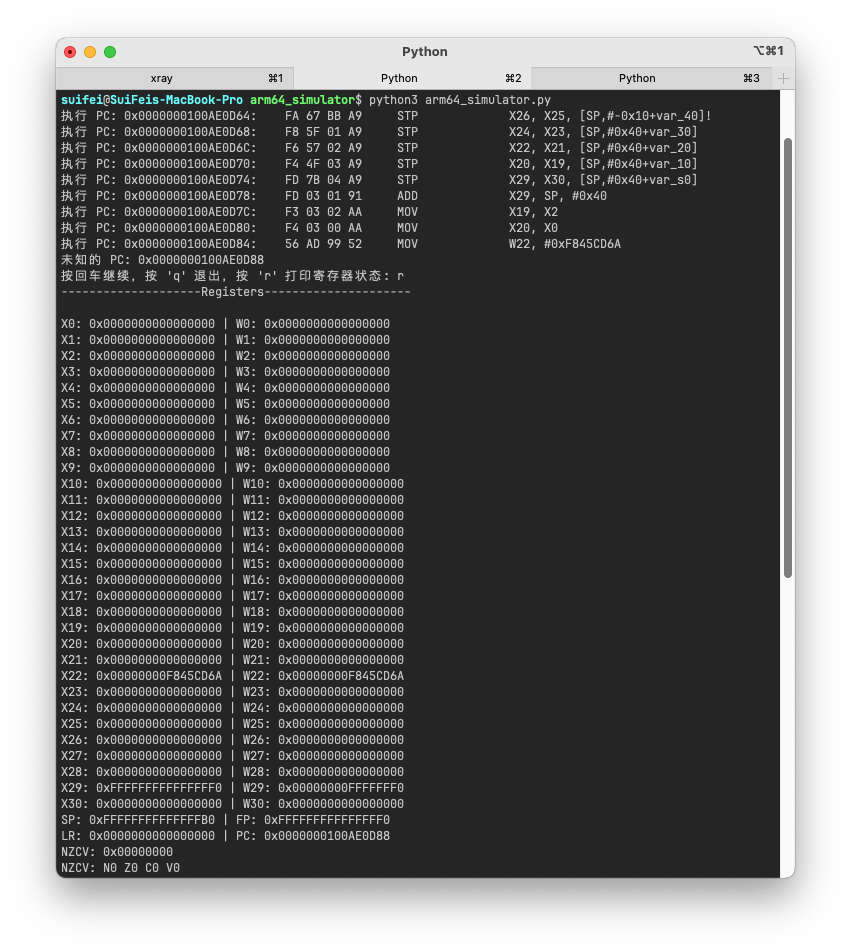
在本地模拟 ARM64 汇编指令和内存变化,用示例与截图解释指令执行过程。
01 / PROJECT OVERVIEW
项目研究解读
在本地模拟 ARM64 汇编指令和内存变化,用示例与截图解释指令执行过程。 本仓库以 Assembly 为主要技术栈,当前快照索引 19 个文件。报告依据README 与目录结构整理,重点呈现项目用途、工程结构和复用方式,不把宣传描述等同于验证结论。
02 / CORE CAPABILITIES
值得关注的能力
- 01
围绕“在本地模拟 ARM64 汇编指令和内存变化,用示例与截图解释指令执行过程”提供公开实现或研究资料
- 02
以 Assembly 为主,保留 19 个可检查仓库文件
- 03
提供原始 GitHub 链接、目录导览和本地研究快照,便于复核与二次开发
03 / ENGINEERING
工程与仓库结构
仓库以 Assembly 为主要实现语言,研究快照包含 19 个文件、5 个主要顶层入口。已提供 README 作为使用与能力说明。 项目最近更新时间为 2026-07-17,许可标记为 MIT License。
项目文件与实现资料
项目文件与实现资料
项目文件与实现资料
项目文件与实现资料
项目文件与实现资料
04 / USE CASES
适合用在哪里
- 学习项目设计与实现
- 评估后用于二次开发
- 作为相关领域的研究参考
05 / QUICK START
从仓库开始
以下命令摘自项目 README 或根据仓库地址生成。请先阅读源仓库的安装要求、许可和脚本,再在自己的环境中运行。
git clone https://github.com/suifei/arm64-assembly-simulator.git
cd arm64-assembly-simulator
06 / REPOSITORY MAP
目录证据导览
这里列出快照中的前 19 个索引文件中的代表路径,帮助你快速定位源码、文档、测试与资源。
.gitignore.vscode/launch.jsonLICENSEREADME.mdREADME_zh.mdarm64_simulator/arm64_simulator.pyarm64_simulator/samples/asm_code.jsonarm64_simulator/samples/diasm.sarm64_simulator/samples/memory.sarm64_simulator/samples/memory_data.jsonarm64_simulator/samples/output1.sarm64_simulator/samples/output2.sarm64_simulator/samples/output3.sscreenshots/1.pngscreenshots/2.pngscreenshots/3.pngscreenshots/4.pngscreenshots/5.pngscreenshots/6.png
07 / SOURCE NOTES
README 原文摘录
保留原始说明便于复核。中文研究结论以当前快照为依据,后续变化请以 GitHub 仓库为准。
ARM64 Assembly Simulator
[[图片] ARM64](https://GitHub.com/suifei/arm64-assembly-simulator) [[图片] GitHub stars](https://GitHub.com/suifei/arm64-assembly-simulator/stargazers/) [[图片] GitHub watchers](https://GitHub.com/suifei/arm64-assembly-simulator/watchers/) [[图片] GitHub forks](https://GitHub.com/suifei/arm64-assembly-simulator/network/) [[图片] GitHub followers](https://github.com/suifei?tab=followers) [[图片] Twitter Follow](https://twitter.com/csuifei)
[[图片] GitHub top language](https://github.com/suifei/arm64-assembly-simulator) [[图片] Python](https://www.python.org/) [[图片] Code Style](https://github.com/psf/black) [[图片] GitHub language count](https://github.com/suifei/arm64-assembly-simulator) [[图片] GitHub code size in bytes](https://github.com/suifei/arm64-assembly-simulator) [[图片] GitHub repo size](https://github.com/suifei/arm64-assembly-simulator) [[图片] GitHub tag](https://GitHub.com/suifei/arm64-assembly-simulator/tags/) [[图片] GitHub commit activity](https://github.com/suifei/arm64-assembly-simulator/graphs/commit-activity) [[图片] GitHub last commit](https://github.com/suifei/arm64-assembly-simulator/commits) [[图片] GitHub contributors](https://GitHub.com/suifei/arm64-assembly-simulator/graphs/contributors/) [[图片] GitHub issues](https://github.com/suifei/arm64-assembly-simulator/issues) [[图片] GitHub closed issues](https://github.com/suifei/arm64-assembly-simulator/issues?q=is%3Aissue+is%3Aclosed) [[图片] GitHub pull requests](https://github.com/suifei/arm64-assembly-simulator/pulls) [[图片] GitHub closed pull requests](https://github.com/suifei/arm64-assembly-simulator/pulls?q=is%3Apr+is%3Aclosed) [[图片] GitHub](https://github.com/suifei/arm64-assembly-simulator/blob/master/LICENSE)
A lightweight ARM64 assembly code and memory simulator designed to parse and execute ARM64 assembly instructions from .s files, typically generated by IDA Pro's disassembly.
[[中文说明]](README_zh.md) [[English]](README.md)
Table of Contents
- ARM64 Assembly Simulator
- Table of Contents
- Overview
- Features
- Use Cases
- Getting Started
- Prerequisites
- Installation
- Usage
- Configuration
- Additional Examples and Source Code
- Contributing
- License
- Author
Overview
This repository contains a lightweight ARM64 assembly code and memory simulator designed to parse and execute ARM64 assembly instructions from .s files, typically generated by IDA Pro's disassembly. It's an ideal tool for those looking to understand the behavior of ARM64 instructions, particularly useful for educational purposes, security analysis, and performance tuning.
Features
- Lightweight and Standalone: Easy to deploy and run without heavy dependencies.
- Direct Parsing from IDA Outputs: Seamlessly integrates with disassembly files generated by IDA Pro.
- Detailed Execution Trace: Tracks and displays changes in register and memory states after each instruction execution.
- Support for Step-by-step and Continuous Execution: Offers flexibility in instruction execution to cater to different analysis needs.
- Simulates Register and Memory Operations: Enhances understanding of ARM64 operations through practical simulation.
- Extensibility: Supports custom pre- and post-execution hooks, allowing the insertion of custom logic before and after instruction execution.
Use Cases
- Educational Tool: Helps in learning and teaching the structure and applications of the ARM64 instruction set.
- Prototyping and Testing: Allows for quick simulation of instruction effects before actual implementation.
- Security Analysis: Useful in analyzing how code manipulations affect program states, potentially uncovering security vulnerabilities.
- Performance Analysis: Assists in understanding and optimizing code that is critical for performance.
Getting Started
Prerequisites
Ensure you have Python 3.x installed on your machine. This simulator does not require any additional libraries for basic operations.
Installation
Clone the repository to your local machine:
git clone https://github.com/suifei/arm64-assembly-simulator.git
cd arm64-assembly-simulator
Usage
- Place your
.sfiles containing ARM64 assembly code in thesrc/samplesdirectory. - Run the simulator with the following command:
[图片] IDA [图片] diasm.s [图片] memory.s
cd arm64_simulator
python arm64_simulator.pyConfiguration
You can modify the ARM64Simulator class instantiation in arm64_simulator.py to enable step-by-step execution or verbose output, depending on your analysis needs.
- Basic Setup and Execution:
# Load assembly code and memory settings
asm_data = read_file("samples/diasm.s")
asm_code = load_asm_code(asm_data)
memory_lines = read_file("samples/memory.s")
memory_data = parse_memory_lines(memory_lines)

# Initialize the simulator
vm = ARM64Simulator(memory_data, step_pause=False, verbose=True, output_file="samples/output.s")

# Run the simulator starting from a specified PC address
vm.run(asm_code, pc=0x100AE0D64)- Using Hooks to Modify Instruction Behavior:
# Define a post-execution hook to convert all CSET instructions to NOP
def nop_ops_after_hook(vm, op_name, operands):
    if op_name == "CSET":
        print(f"AFTER-HOOK# {op_name} to NOP")
        op_name = "NOP"
        operands = []
    return op_name, operands

# Set the simulator's output file
vm.set_output_file("samples/output_with_hooks.s")

# Add the hook and rerun the simulator
vm.hook_instruction(after=nop_ops_after_hook)
vm.run(asm_code, pc=0x100AE0D64)
Additional Examples and Source Code
For more examples and a deeper understanding of the simulator's capabilities, please refer to the source code available in this repository. The source files contain detailed comments and diverse use cases that can help you get acquainted with advanced features and customization options.
Contributing
Contributions are welcome! Please feel free to submit pull requests, suggest features, or report bugs.
License
This project is licensed under the MIT License - see the LICENSE file for details.
Author
- c3VpZmUgQGdtYWlsIGRvdGNvbQ==
- QQ Group: 555354813
Feel free to contact me for any questions or feedback related to this project.
KEEP EXPLORING
继续阅读同类作品。