save-my-c-drive
C盘救星:不删数据,用 NTFS Junction 一键迁移 AI 工具、模型与缓存目录并随时恢复。
01 / PROJECT OVERVIEW
项目研究解读
C盘救星:不删数据,用 NTFS Junction 一键迁移 AI 工具、模型与缓存目录并随时恢复。 本仓库以 HTML 为主要技术栈,当前快照索引 143 个文件。报告依据README 与目录结构整理,重点呈现项目用途、工程结构和复用方式,不把宣传描述等同于验证结论。
02 / CORE CAPABILITIES
值得关注的能力
- 01
围绕“C盘救星:不删数据,用 NTFS Junction 一键迁移 AI 工具、模型与缓存目录并随时恢复”提供公开实现或研究资料
- 02
以 HTML 为主,保留 143 个可检查仓库文件
- 03
提供原始 GitHub 链接、目录导览和本地研究快照,便于复核与二次开发
03 / ENGINEERING
工程与仓库结构
仓库以 HTML 为主要实现语言,研究快照包含 143 个文件、18 个主要顶层入口。已提供 README 作为使用与能力说明。 项目最近更新时间为 2026-10-29,许可标记为 Apache License 2.0。
项目文件与实现资料
项目文件与实现资料
项目文件与实现资料
项目文件与实现资料
项目文件与实现资料
项目文件与实现资料
04 / USE CASES
适合用在哪里
- 学习项目设计与实现
- 评估后用于二次开发
- 作为相关领域的研究参考
05 / QUICK START
从仓库开始
以下命令摘自项目 README 或根据仓库地址生成。请先阅读源仓库的安装要求、许可和脚本,再在自己的环境中运行。
git clone https://github.com/suifei/save-my-c-drive.git
cd save-my-c-drive
06 / REPOSITORY MAP
目录证据导览
这里列出快照中的前 143 个索引文件中的代表路径,帮助你快速定位源码、文档、测试与资源。
.gitattributes.githooks/commit-msg.githooks/identity_policy.py.githooks/pre-push.githooks/setup.py.github/workflows/ci.yml.gitignoreCargo.lockCargo.tomlLICENSE-APACHELICENSE-MITREADME.de.mdREADME.ja.mdREADME.ko.mdREADME.mdREADME.zh-CN.mdREADME.zh-TW.mdbuild.rsdocs/application-storage-list.mddocs/application-storage-research.mddocs/development.mddocs/images/screenshot.de.pngdocs/images/screenshot.en.pngdocs/images/screenshot.ja.pngdocs/images/screenshot.ko.pngdocs/images/screenshot.zh-CN.pngdocs/images/screenshot.zh-TW.pngdocs/implementation-status.mddocs/requirements.mddocs/system-command-backend.mddocs/technical-design.mdlocales/de.jsonlocales/en.jsonlocales/ja.jsonlocales/ko.jsonlocales/zh-CN.jsonlocales/zh-TW.jsonresources/savemycdrive.icoresources/savemycdrive.manifestresources/savemycdrive.pngrules/purposes-i18n.jsonrules/savemycdrive-rules.jsonscripts/acceptance.pyscripts/audit_pe.pyscripts/build-knowledge.pyscripts/build.ps1scripts/check-powershell.pyscripts/gui_e2e.pyscripts/make-icon.pyscripts/package-release.pyscripts/research-local.ps1scripts/smoke.pyscripts/test-native.ps1src/batch.rssrc/candidate_list.rssrc/catalog.rssrc/cli.rssrc/elevation.rssrc/engine.rssrc/gui.rssrc/handles.rssrc/i18n.rssrc/inventory.rssrc/lib.rssrc/main.rssrc/native_dialog.rssrc/platform.rssrc/rules.rssrc/scan.rssrc/selection.rssrc/system_ops.rsthird-party-notices/COPYRIGHT-library.htmlthird-party-notices/README.mdthird-party-notices/block-buffer-0.10.4/LICENSE-APACHEthird-party-notices/block-buffer-0.10.4/LICENSE-MITthird-party-notices/cfg-if-1.0.4/LICENSE-APACHEthird-party-notices/cfg-if-1.0.4/LICENSE-MITthird-party-notices/cpufeatures-0.2.17/LICENSE-APACHEthird-party-notices/cpufeatures-0.2.17/LICENSE-MITthird-party-notices/crt/COPYINGthird-party-notices/crt/COPYING.MinGW-w64-runtime.txtthird-party-notices/crt/COPYING.MinGW-w64.txtthird-party-notices/crypto-common-0.1.7/LICENSE-APACHEthird-party-notices/crypto-common-0.1.7/LICENSE-MITthird-party-notices/dependencies.jsonthird-party-notices/digest-0.10.7/LICENSE-APACHEthird-party-notices/digest-0.10.7/LICENSE-MITthird-party-notices/gcc-libs/COPYING.LIBthird-party-notices/gcc-libs/COPYING.RUNTIMEthird-party-notices/gcc-libs/COPYING3
07 / SOURCE NOTES
README 原文摘录
保留原始说明便于复核。中文研究结论以当前快照为依据,后续变化请以 GitHub 仓库为准。
SaveMyCDrive
Set your C: drive free. Move your data. Keep your workflow. Nothing deleted · One-click migrate · One-click restore
[[图片] Release](https://github.com/suifei/save-my-c-drive/releases/latest) [[图片] CI](https://github.com/suifei/save-my-c-drive/actions/workflows/ci.yml) [图片] Windows 10/11 x64 [[图片] License](#license)
English · 简体中文 · 繁體中文 · 日本語 · 한국어 · Deutsch
SaveMyCDrive moves the space-hungry folders under AppData and your home directory to another drive, then leaves a directory junction at the original path. Your apps keep using the path they know while the data lives where you chose. Want it back? Restore it.
Download and use
Get SaveMyCDrive-v -windows-x64.zip from Releases, unzip, and run. No installer and no runtime to install.
| File | Purpose |
|---|---|
SaveMyCDrive.exe | Graphical interface |
smcd.exe | Command line, sharing the same core and checks |
In the GUI:
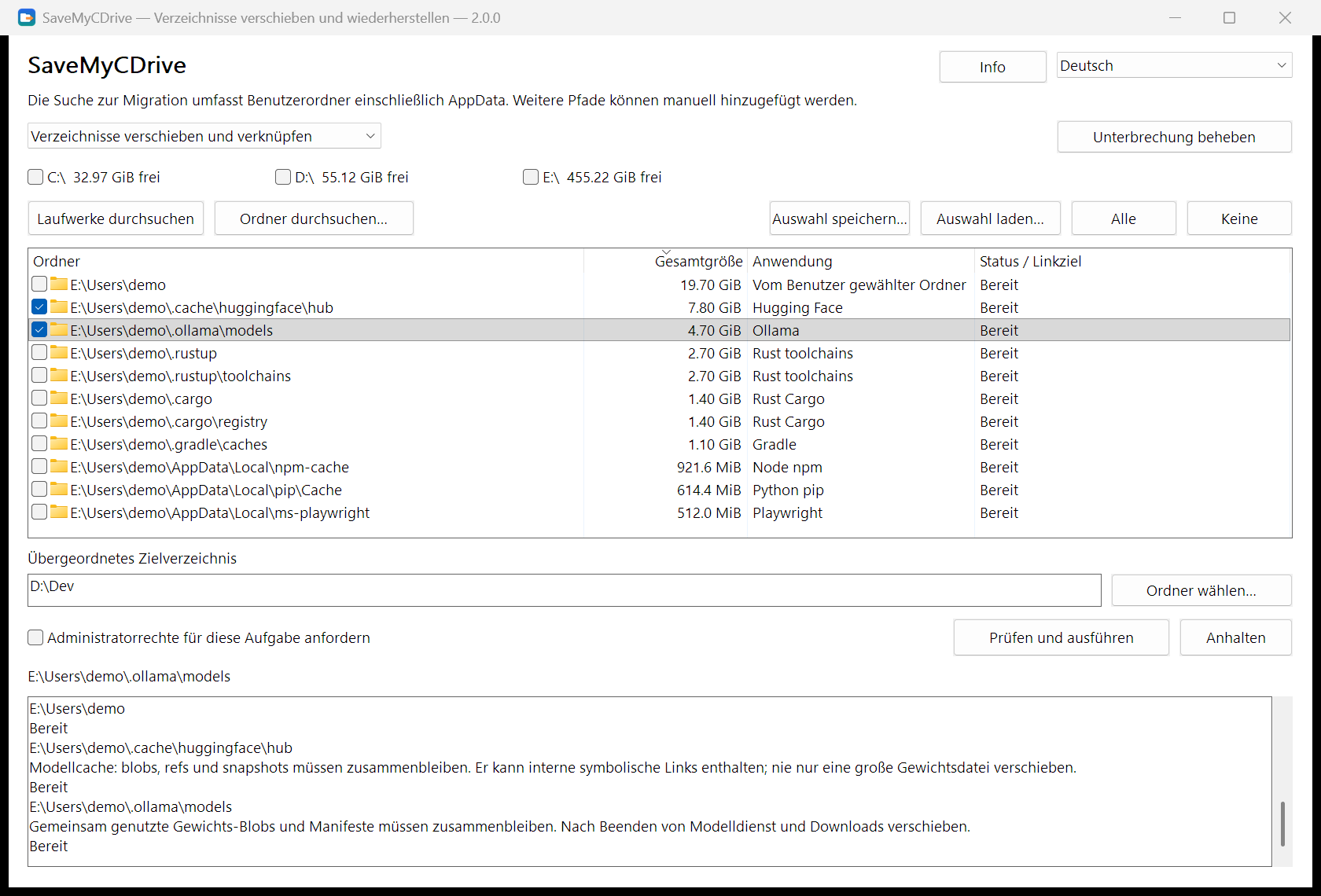
- Scan. Tick drives and choose Scan selected drives, or Scan a folder…. Scanning is read-only.
- Select. Each row is a recognized folder with its size, application and status. Nothing starts checked; grayed rows cannot be moved right now. Select a row to see its notes in the log.
- Choose a destination. Enter a destination root such as
D:\Dev, choose Review and run, and check eachsource → destinationand the programs currently using those folders. - Restore when needed. Switch the mode to restoring links, scan the drive holding the junctions, check them, and restore.
From the command line:
smcd scan --volumes C: --mode migrate --measure --out scan.json
smcd plan --scan scan.json --select   --destination D:\Dev --out plan.json
smcd apply --plan plan.json
smcd restore --source C:\Users\You\.cache\huggingface
smcd history
smcd --help lists every command; --state PATH keeps transaction records in a folder you choose (portable use).
“I installed my apps on D:. Why is C: full again?”
You picked D: in the installer, keep projects elsewhere, and emptied the Recycle Bin. C: is still red.
An AI tool downloaded another model. Your editor added extensions. A compiler built its cache, and a package manager kept its own copy of everything, all under AppData or hidden folders in your home directory. Then an update fails, a build stops, or a download runs out of room halfway.
Your computer has room. Your tools just keep choosing the same place. If you're new to this, unfamiliar folders are scary to touch. If you're experienced, you can write mklink, but you still have to find folders, check what's using them, move data and remember what went where, every time. SaveMyCDrive puts discovery, review, migration and restoration in one flow.
Move, don't delete: how it compares
Cleaning only buys time: deleted caches grow back, models have to be downloaded again, and session history or extensions can't be deleted at all. SaveMyCDrive deletes nothing; it gives that data a home on another drive.
| Disk cleaners (CCleaner, Storage Sense, 360, etc.) | Asking an AI assistant / AI skill each time | SaveMyCDrive | |
|---|---|---|---|
| Approach | Delete caches and "junk" | The AI inspects folders, decides and runs commands on the spot | Move whole folders to another drive, junction at the original path |
| AI coding tool data (sessions, models, extensions) | Mostly unrecognized: delete or ignore | Judged on the fly; conclusions can change each time | 124 built-in rules match location and app markers |
| Data loss | Deleted is gone; re-download or rebuild | Possible: important folders mistaken for cache | Nothing deleted; source retired only after a successful copy, stops on leftovers |
| A few weeks later | It grows back; clean again | It grows back; ask the AI again | New files land on the new drive, not on C: |
| Changed your mind | No way back | Depends on what the AI actually ran | One-click restore, including files added since |
| Power loss / interruption | — | Half-run commands are hard to trace | Journaled; continue or roll back from the log |
| Cost per run | Free; some stay resident or show promotions | Many tokens per run, inconsistent results | Zero tokens, repeatable; exits when done, no network |
| Auditable | Closed source | Prompts are readable, but the model decides what runs | Open source; rules and procedure are fixed |
Some cleaners also offer a "move C: data" feature, but the scope is a vendor list that generally doesn't cover AI coding tools.
Why not just ask an AI to clean up each time?
AI is great for one-off, unfamiliar problems. Freeing C: every few weeks is the opposite: repetitive, and your data is on the line.
- Inconsistent. The same folder can be "safe to delete cache" in one session and "keep" in the next, depending on the model and the prompt.
- Mistaken deletes.
.claude\projectssounds like a cache but holds Claude Code's session history.huggingface\hubblobs and snapshots reference each other; deleting "the biggest files" corrupts models and costs tens of GB to re-download. One mistyped path inRemove-Item -Recurseorrm -rfcan take out the parent folder. - Token cost. Every run lists folders, sums sizes and looks things up, often tens of thousands of lines of output; two weeks later C: is full again and you pay again.
- Treats the symptom. Whatever was deleted grows back.
SaveMyCDrive turns those judgments into reviewable rules and a fixed procedure: the same input gives the same result, you preview before anything runs, you can roll back afterwards, and it costs no tokens.
How it works
| Path your apps use | Where the data lives | |
|---|---|---|
| Before | C:\Users\You\.cache\huggingface | On C: |
| After | Same path, now a junction | D:\Dev\huggingface |
It relies on the tools Windows already ships:
- Check. Programs using the folder are listed by product name so you can close them. SaveMyCDrive never ends processes.
- Copy. The system
robocopycopies, multi-threaded, into a staging folder next to the destination; its exit code decides success. - Switch. The staged copy takes its place and
robocopy /MOVEretires the source. If any file is left behind, SaveMyCDrive stops and keeps the data. - Link. The system
mklink /Jcreates the junction at the original path.
Every step is journaled. After a power loss or interruption, Recover interrupted work continues or rolls back from the journal and the actual disk state; each folder's result and the batch result are recorded separately.
Built around the folders that keep growing
A built-in application knowledge pack (124 rules) recognizes folders by location and application markers, not by name alone:
| What keeps growing | Examples |
|---|---|
| AI tools and local models | Claude Code, Codex, Kimi Code, Cursor, Hugging Face, Ollama, Torch, ModelScope |
| Compiler and build data | Rust toolchains / Cargo, Go, vcpkg, C++ IntelliSense |
| Package caches | npm, pip, uv, pnpm, NuGet, Gradle, Playwright |
| Editors and app data | VS Code, Cursor, Obsidian, WeCom and more |
See the directory list (Chinese). Folders marked for review are listed, but you should read their notes first.
Safety
- Scanning is read-only. It never starts a migration, restoration, deletion or repair.
- You decide. Candidates and every optional switch start off; existing destination content is never silently merged or overwritten.
- Uncertainty stops the operation. Failed copies, folders still in use, identity changes or unknown link types keep the data in place and explain why.
- No deleting through links. Cleanup is
robocopy /MOVEplus empty-directory removal; never an unverified recursive delete. - Restore brings back current files, including changes made since migration. Junctions you created by hand are found and restorable too.
- Everything stays local. No telemetry, no network access, no uploads.
FAQ
Do I need administrator rights? Whole-drive fast scanning (NTFS MFT) does; SaveMyCDrive asks via UAC when needed and falls back to a normal scan if you decline. Migrating user folders usually doesn't.
Will every app work after migration? Keeping the original path is the method, not a universal compatibility guarantee. Updaters, permissions and folder contents all matter; known restrictions are shown in the list and log.
Which drives are supported? Local NTFS volumes. Network paths and other filesystems are out of scope. The destination needs enough space and must stay available while apps use the data.
How fast is it? Scanning reads NTFS MFT/USN directly; copying uses robocopy /MT:8. Real time depends on data size and disk speed.
Interface language
Simplified Chinese is the maintained interface language. English, Traditional Chinese, Japanese, Korean and German remain available but are not updated for new text; missing strings fall back to English.
Development
See the requirements, technical design, system command contract, build and validation and implementation status (Chinese). Written in Rust; the CLI and the native Win32 GUI share one core.
If SaveMyCDrive helps, a Star helps the next person with a full C: drive find it.
Contact
- QQ: 410000
- Issues and suggestions: GitHub Issues
License
Licensed under either of MIT or Apache-2.0, at your option. Dependency notices ship with the release archive (third-party-notices/).
KEEP EXPLORING
继续阅读同类作品。